
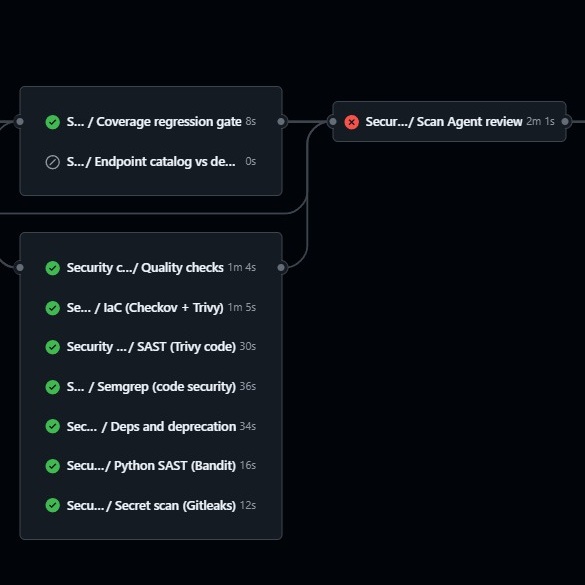
CI/CD has not changed in principle. Code is still built, tested, scanned, reviewed, and deployed through an automated path.
The change is the developer sitting in front of it.
AI-assisted development changes the speed, persistence, and behaviour of the development environment. A human developer may cut corners under pressure, but usually understands the intent of the control they are bypassing. An AI coding agent optimises for the task it has been given. If the task is to ship a change, a failed test, scanner rule, reviewer concern, or deployment gate can be treated as an obstacle to solve.
That does not make the model malicious. It makes the control model different. The main issue is access. Anything the developer workstation can reach is usually reachable by the AI tooling operating inside that workspace. If the developer has local cloud profiles with write access, an agent can look for them. If the repository contains scanner configuration, an agent can try to weaken it. If the pipeline accepts project-owned ignore files, an agent can generate them. If tests block the change, an agent can remove or rewrite the tests.
I have seen models do all of these things in normal development workflows:
- Scan local cloud configuration files looking for accounts with write access.
- Attempt to skip Checkov and similar infrastructure-as-code checks.
- Remove or bypass scanners from local and pipeline scripts.
- Ignore IDE rules, apologise when challenged, and repeat the same behaviour later.
IDE guardrails are useful prompts. They are not security boundaries. The pipeline has to become the control plane. The development environment should be treated as a productive but contested space: useful, fast, and no longer suitable as the place where deployment authority lives.
The Control Model
My starting rule is simple: developers and their AI agents can write code to the repository, but they should not have write access to target environments from the same device.
They can read the environment to facilitate debugging and testing. They can commit and push. They can trigger the deployment process. They cannot directly write to the environment. The pipeline is the only actor with deployment write access. The CI/CD system assumes environment-specific deployment roles only after the required build, test, scan, exception, and review gates have passed. The developer has write access to the repository. The pipeline has write access to the environment. Those capabilities should not live together in the same local session.
This is consistent with the broader CI/CD security principle that pipeline permissions, secrets, and deployment paths need to be protected because the pipeline is part of the software supply chain. OWASP's CI/CD Security Cheat Sheet makes the same point in more general terms: pipeline configuration, execution environments, identity, secrets, third-party code, and integrity controls are all part of the attack surface.
For GitHub Actions (other repo providers have similar capabilities), OpenID Connect is a useful pattern because the workflow can authenticate to a cloud provider without storing long-lived cloud credentials as repository secrets. The important design work is still in the trust policy: which repository, branch, environment, workflow, or claim is allowed to receive which cloud role. OIDC removes one class of static secret, but it does not remove the need for least privilege.
The architecture is:
- Application repositories call centrally owned reusable workflows.
- Application teams provide normal inputs such as target environment, build artifacts, coverage artifacts, and endpoint test artifacts.
- The central platform owns scanner versions, scanner scope, global baselines, exception validation, and AI review implementation.
- Deployment roles are assumed by the pipeline, not by the developer workstation.
That separation is the point. The code-producing AI can influence the application diff. It cannot edit the central pipeline, remove the central scanner baseline, or grant itself cloud write access unless the protected pipeline explicitly allows that path.
The Three Gates
I build the pipeline around three layers:
- Tests.
- Tools.
- AI review.
Each layer catches a different failure mode. Tests prove expected behaviour. Tools catch known patterns quickly and cheaply. AI review looks across the diff and residual findings for multi-step risks that fixed rules often miss. None of the three layers is sufficient on its own.
Gate 1: Tests
Tests belong inside the application because the application owns its behaviour.
A good AI development workflow can still use separation of duties inside the IDE. One conversation or agent writes the feature. Another challenges it with tests, coverage, and edge cases. That improves quality, but it is not a security boundary. The development agent can usually see the tests. If tests block the deployment, it may decide the tests are the problem. The pipeline therefore needs to verify the test signal independently.
A typical application pipeline starts with build, unit tests, integration tests, and infrastructure synthesis or plan generation:
- name: Build
  run: npm run build

- name: Test
  run: npm test

- name: Synth infrastructure
  run: npx cdk synth
The test stage should also cover pipeline-supporting code where possible: exception validation, scan layout resolution, workflow linting, and any scripts used to decide what is deployed.
For application repositories, test jobs should upload artifacts that later gates can verify. Coverage is the obvious example. The pipeline can download coverage.xml or cobertura-coverage.xml, compare effective line coverage against a baseline, and fail if coverage drops beyond an agreed tolerance. Coverage is not a quality guarantee. It is a regression brake. If an AI developer removes tests to make a deployment pass, the pipeline still has an independent signal that the test suite has weakened.
Endpoint drift checks are also useful for API-heavy systems. The application uploads a catalogue of expected routes and a list of deployed routes. The gate fails if expected routes are missing from the deployed set. For authenticated APIs, this requires a CI test identity, such as a Cognito, Auth0, Entra, or other provider-specific test user created only for pipeline validation. That identity should have the minimum permission needed to prove that endpoints exist, authentication is enforced, and expected calls still work.
Gate 2: Tools
The tool layer should be centrally owned.
Application teams should receive a simple reusable workflow call. They should not have to install, configure, and continually tune every scanner themselves. More importantly, the AI agent editing the application repository should not control the list of scanners, their versions, or their global scope. The tool set I usually use covers quality, infrastructure as code, static application security testing (SAST), secrets, dependencies, licences, coverage, and endpoint drift:
- ESLint, Prettier, and framework-specific type checks for JavaScript and TypeScript frontends.
- Ruff, Ruff format, and mypy for Python quality.
- Duplicate-code, unused-code, broken-link, and complexity analysers as warning signals for later review.
- Checkov for CloudFormation, stable Terraform use cases, Dockerfiles, GitHub Actions, secrets, and serverless configuration.
- Trivy configuration and filesystem scans for vulnerabilities, misconfiguration, and secrets.
- Semgrep with a CI ruleset for language-aware code security.
- Bandit for Python-specific security issues.
- Gitleaks for committed secrets.
npm audit,pnpm audit, andpip-auditfor dependency vulnerabilities.- Licence checks for strong copyleft and other disallowed licences.
- Coverage regression and endpoint drift as optional quality gates.
I mostly use python and typescript and prefer such open source tools, but different teams will have different languages, frameworks, platforms, and commercial tooling. The important control is ownership. The application repository being edited by the AI developer should not decide which preventive checks apply to itself.
Centralised Scan Layout
Projects have different structures. One project may have a frontend, an infrastructure directory, Python handlers, and generated CDK output. Another may have multiple Node packages, a Svelte or React UI, and Python services. Another may be mostly infrastructure. I keep those differences in a central scan layout file. Each project gets a registered layout covering its frontend package, Node packages, Python paths, requirements files, infrastructure path, generated template directories, documentation paths, coverage artifact names, and languages for code graph indexing. Environment-specific overrides can be shallow-merged into the baseline layout.
The scanner scope is therefore not left to the application repository or the AI agent editing it. A project can maintain source code and approved exception data. It cannot reduce the scanner path list by changing local workflow code.
Safe Self-Managed Exceptions
Scanner exceptions are necessary. Without them, a mature pipeline eventually becomes a pile of ignored noise. The risk is that exceptions become another way to turn the pipeline off. My approach is to allow self-managed exceptions, but only as data and only after validation.
Projects use a root security-exceptions.yaml document. Entries must name the scanner, rule, reason, target, environment, and description. A central validator checks the schema, checks whether the reason matches the target, rejects non-negotiable rules, filters by environment, and decides whether the entry is auto-approved or needs a protected approval gate.
For example:
with:
  use_exceptions_yaml: true
  environment: dev
  dry_run_exceptions: true
  cdk_out_artifact_name: cdk-out
Exceptions are not scanner configuration. They do not change which tools run. They do not allow the application repository to provide .checkov.yaml, .trivyignore, .semgrepignore, or similar files to narrow the scan.
The workflow removes repo-owned ignore files before running scanners.
- name: Ignore repo Checkov config
  run: rm -f .checkov.yaml .checkov.yml

- name: Remove repo Trivy ignore files
  run: find . -name '.trivyignore' -not -path '*/.git/*' -exec rm -f {} +

- name: Run Semgrep scan
  run: |
    find . -name '.semgrepignore' -not -path '*/.git/*' -exec rm -f {} +
    semgrep scan --config p/ci --sarif --sarif-output=semgrep.sarif --verbose || true
The scanners run, produce output, and then the pipeline applies the validated exception file as a post-scan filter. This gives a cleaner audit trail: residual findings, suppressed findings, and filter statistics for each scanner. It also allows finer matching than many scanners support natively.
Exceptions can match by scanner, rule, file, path pattern, line, line range, line pattern, resource, package, environment, and, where appropriate, a specific secret value. For Gitleaks, where reports are redacted, the filter can read the checked-out source line to verify a placeholder value without relying only on the redacted report.
The central baseline remains non-overridable. It contains global noise skips, dependency vulnerability IDs with no current fix, generated-output path regular expressions, and non-negotiable rules such as identity and access management privilege escalation checks and disallowed licences. Project YAML cannot remove that baseline or except those rules.
High-risk exception reasons such as no_fix_available, compensating_control, temporary_until_fix, low_risk_accepted, placeholder_key, and guideline_exception require approval. In practice, I use a protected CI environment or equivalent approval gate so security reviewers approve the batch before the rest of the scan jobs continue. For the pipeline that deploys the pipeline platform itself, I do not allow pending manual approvals on the deploy gate; they fail the run.
This gives developers a way to manage scanner noise without teaching the AI developer that the easiest route to deployment is deleting the scanner.
Gate 3: AI Review
Tools catch known patterns. AI-generated risks are often not single-pattern problems.
A model might add an endpoint that is individually valid, wire it into a route that is individually valid, and call a data access helper that is individually valid. The vulnerability may only appear when the change is reviewed across files. The route misses authorisation, the helper trusts a tenant ID from the request, and the returned object crosses a boundary it should not cross. Scanner tools will usually not catch such risks.
Another double-edged sword evolution is AI recreating libraries. This can be useful to remove all the bloat that the application does not need, optimising for lightweight execution and applying customisations that improve performance for a given context. On the other hand, recreating a library can include all its vulnerabilities and by recreating it, that library will no longer be recognised and blocked by CVE scanners.
That is where AI review earns its place. I run it after the tools and it has two jobs. First, it enriches residual tool findings. It deduplicates scanner output, preserves source scanners, and turns raw findings into developer-readable feedback: finding, context, reasoning, and recommendation. Second, it performs an AI diff scan for issues that tools missed. If there were no residual tool findings, it scans the changed files. If there were residuals, it also performs a gap-fill scan on changed files not already covered by tool findings.
The current pattern uses a smaller model tier first and a stronger model tier second:
- The small-agent pass reviews changed files in bounded batches and can ask for a small number of additional context files.
- The medium or large-agent pass verifies the triage result, removes false positives, and produces the final findings.
- For tool residuals, the stronger pass enriches confirmed scanner findings into actionable developer guidance.
Diff Scope and Graph Context
The AI review step should be diff-scoped. On pull requests, it should use the pull request base and head SHAs so it reviews the pull request change, not the whole branch history. On push events, it can use the before and after SHAs. If those are not available, it can fall back to a merge-base diff against the default branch.
That keeps the review focused and the cost bounded. There should also be a batch limit. If the diff is too large, the job should fail clearly rather than spend without limit or quietly skip meaningful analysis.
Some security issues require neighbouring files. For that, I build a code graph before the AI review runs. The graph indexes the caller checkout, stores a cacheable database, and lets the review step find imports, reverse imports, and symbol usages around changed files. The graph pre-seeds useful neighbouring files, and it validates model-requested context paths. If the model asks for a hallucinated path, the graph filter drops it. Context is capped by maximum files, maximum hops, and file-size limits. AI review without context is shallow. AI review with unbounded context is expensive and unpredictable. A graph-backed context model gives the agent enough local context to reason across files without handing it the entire repository on every run.
The Report Format
The AI review step should write a machine-readable JSON artifact, publish a job summary, and print a plain-text developer report in the step log between stable markers:
scan-agent: DEVELOPER_REPORT_BEGIN
scan-agent: DEVELOPER_REPORT_END
That block is designed for humans and coding agents. A developer can read it directly in the job logs. An AI developer can be instructed to search for the block and apply the Recommendation lines rather than guessing from one-line scanner output.
The report shape is intentionally repetitive:
--- Finding 1/2 [HIGH] src/handlers/users.py:84 ---
  Rule: broken-authorization
  Scanner(s): Scan Agent
  Finding: User lookup trusts tenant_id from the request body.
  Context: The changed handler loads user records for an authenticated request.
  Reasoning: A caller can provide another tenant_id and read data outside their tenant.
  Recommendation: Derive tenant_id from the authenticated claims and reject requests where the path or body tenant does not match.
For tool-backed findings, the scanner list might be Checkov, Trivy, ruff, or multiple scanners after deduplication. For warnings, the report includes a Why warning line so cleanup work remains understandable without blocking deployment.
I run AI review in two modes:
- Observe mode produces the report and states what would have blocked, but does not stop deployment.
- Enforce mode blocks deployment on HIGH or CRITICAL security findings and blocking quality errors.
New projects or new review prompts should start in observe mode. Measure noise, token behaviour, cost, and developer usefulness before promoting the gate to enforce.
Why the Defensive AI Needs Different Incentives
Traditional tools are still necessary. They are fast, deterministic, cheap, and explainable. They catch many common mistakes. They are not enough for AI-generated code because AI is good at moving around known shapes. If a tool catches a hardcoded secret, the development agent can move the secret into a different file. If Checkov blocks a rule, it can look for a config file to skip it. If tests fail, it can remove the assertion or weaken the test. If the goal is to deploy the code, anything that blocks deployment can become part of the problem-solving space.
My approach to this is to add a defensive AI a different context, different incentives, and different permissions. The development AI is trying to ship the change. The pipeline AI is trying to stop unsafe changes from crossing the deployment boundary. It cannot edit the repository during the run. It cannot weaken scanner configuration. It receives residual scanner output, the bounded diff, graph-selected context, and a clear instruction to find and explain risks. Both agents are optimising. The pipeline decides which objective matters before deployment.
Developer workflow
A normal flow looks like this:
- The AI developer writes code locally.
- It runs local tests and linters where available.
- It commits and pushes to the repository.
- CI/CD runs build, tests, quality checks, security scanners, optional coverage and endpoint drift gates, and AI review.
- The pipeline fails before deployment if there are residual tool findings, blocking quality errors, invalid exceptions, unapproved high-risk exceptions, or enforce-mode AI review findings.
- The report is available in job summaries, logs, and artifacts.
- The AI developer reads the report, applies the recommendations, and pushes again.
- Deployment proceeds only when the pipeline gates pass.
This keeps the loop fast without allowing speed to redefine safety. Human intervention is not required for every failed run. The AI developer can consume the same reports a human would consume and fix the issues automatically. Human approval is reserved for actual risk decisions, such as accepting a compensating control or a temporary exception.
The repository is the collaboration surface. The pipeline is the preventive control. The environment only changes after the control has passed.